The open source AI agent platform
Free, local-first, multi-provider desktop AI agent. Connect to OpenAI, Anthropic, Gemini, DeepSeek, Ollama, LM Studio, Minimax, Qwen, or any custom endpoint. 18 built-in skills, 34 themes, 20 languages. Your data stays on your machine.
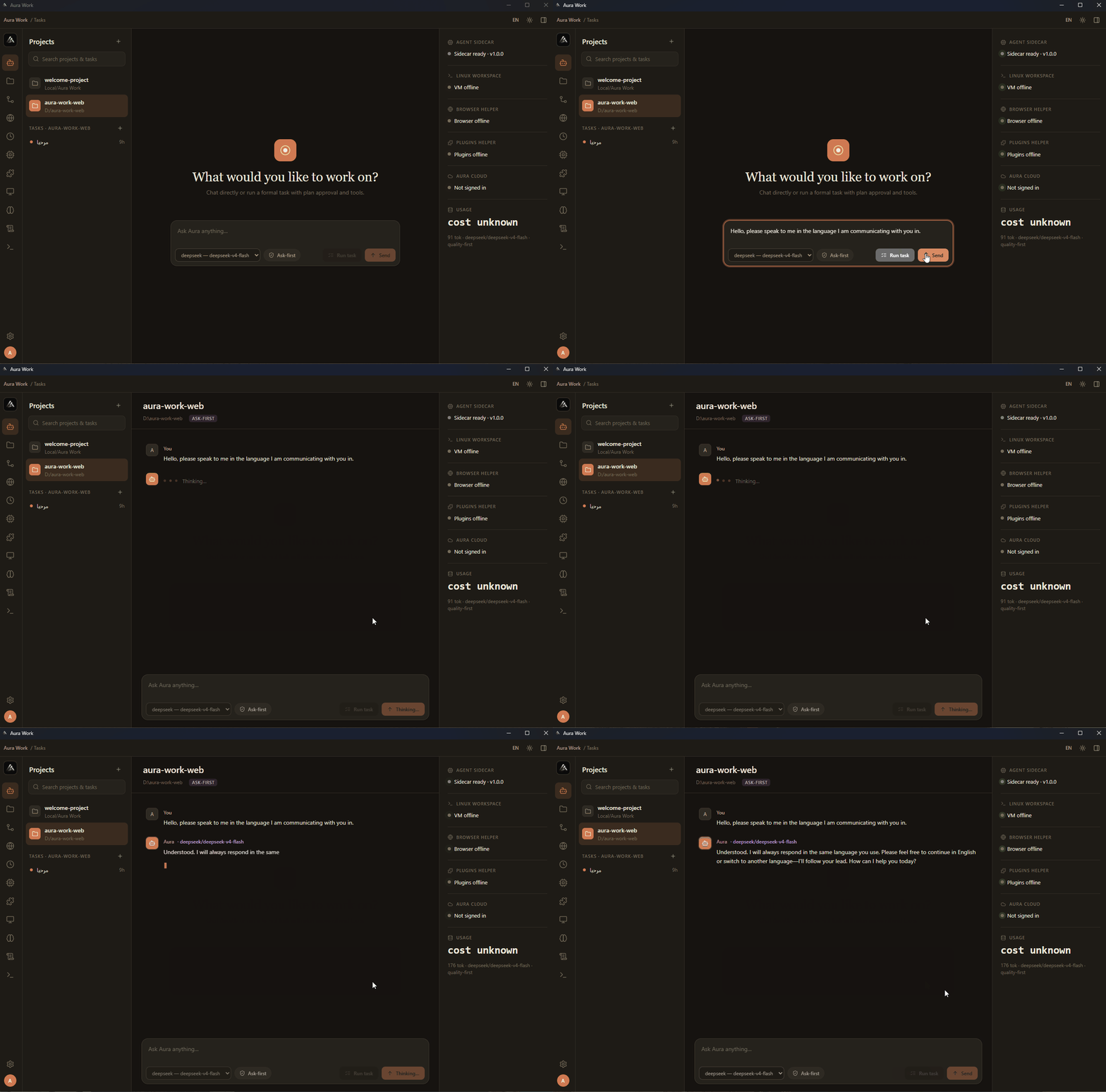
Features
Everything you need, nothing you don't
Local-first, permission-gated, and extensible. Aura Work puts you in control.
10 AI Providers
OpenAI, Anthropic, Gemini, DeepSeek, Ollama, LM Studio, Minimax, Qwen, Aura Cloud, or any custom endpoint. Bring your own keys or run 100% local with Ollama.
Local-First & Private
Encrypted vault with OS-backed secure storage (ChaCha20-Poly1305 + Argon2). No telemetry. Your keys never leave your machine.
Permission-Gated
3 permission levels: read-only, ask-first, act-without-asking. High-impact actions always require approval. Full audit log of every operation.
18 Built-in Skills
Documents, spreadsheets, presentations, PDFs, research, image generation, data analysis, browser automation, and more. One-click install from Marketplace.
20 Languages
Full RTL support for Arabic and Persian. Weblate-powered community translations. 8 sans-serif fonts including Cairo, Tajawal, and Almarai for Arabic.
34 Themes
Nord, Dracula, Cyberpunk, Sakura, Matrix, Ocean, and 28 more. Light, dark, AMOLED, and luxury variants. System-aware auto-switching.
Smart Routing
5 routing policies: quality-first, cost-first, privacy-first, local-only, or manual. Auto-discovers available providers and picks the best model per task.
Monaco Editor
Built-in code editor with syntax highlighting, language support, and pending edits approval system. Agent proposes changes, you review and approve.
Task Engine
8 task states from draft to completed. Approve plans, pause/resume, send messages to running tasks. Full cost tracking and token usage per task.
MCP Servers
Model Context Protocol integration. Pre-configured presets for GitHub, PostgreSQL, SQLite, Filesystem, and Puppeteer. Add custom MCP servers.
Scheduled Tasks
Recurring automation with hourly, daily, weekday, weekly, or custom cron schedules. Pre-approved permission profiles for unattended execution.
Browser Automation
AI can browse web pages, extract content, take screenshots, and fill forms. Prompt injection scanning keeps you safe from malicious pages.
Quick Start
Get started in 3 steps
No account required. No API key needed to explore. Just download and go.
1. Download
Grab the installer for Windows (.msi), macOS (.dmg), or Linux (.AppImage / .deb). Or install via npm: npm i -g aura-work
2. Create a Project
Open Aura Work and create a new project by selecting any folder on your machine. The AI agent will understand your codebase automatically.
3. Start a Task
Describe what you want in natural language: "Analyze this codebase", "Create a document", "Research this topic". The agent plans, executes, and asks for approval when needed.
How It Works
Under the hood
Aura Work runs as a desktop app with 7 modular sidecars that handle different capabilities.
Desktop App
Tauri 2 (Rust) + React 19. Manages projects, tasks, files, Git, terminal, settings, and the UI. SQLite database stores everything locally.
Agent Sidecar
Main AI brain. Routes tasks to providers, manages conversation, executes tools, handles streaming responses. Supports 9 AI providers.
Browser Sidecar
Chromium-based browser automation. Browse pages, extract content, take screenshots. Prompt injection scanning for safety.
VM Sidecar
Linux workspace sandbox for safe command execution. WSL2 on Windows, KVM on Linux. Mounts project folders, captures output, redacts secrets.
Cloud Sync Sidecar
End-to-end encrypted sync between devices. AES-256-GCM encryption. Device pairing via QR code. Remote dispatch to run tasks on other devices.
Plugins Sidecar
Load and execute plugins, MCP servers, and sync the Marketplace. Supports custom JavaScript/TypeScript tools with sandboxed execution.
Supported Providers
Connect to any AI provider
Aura Work supports 10 AI providers with automatic model discovery, key rotation, and intelligent routing. Use cloud providers or run 100% local with Ollama.
Get involved
Built in the open
Aura Work is open source and community-driven. Contributions of all kinds are welcome — code, docs, translations, design, and ideas.
FAQ
Common questions
Everything you need to know about Aura Work.